
- Welcome, ( Log in )
All replacement parts at one place - choose from up to 500 000 parts Choose from up to 500 000 parts Example
Use our advanced product search. You will find all parts easily and quickly.
| What you want to look for | Example |
|---|---|
| Replacement part | Display |
| Replacement part + Laptop manufacturer | Display ASUS |
| Replacement part + product number | Display LP156WH2 TL A2 |
| Product number | LP156WH2 TL A2 |
| Product number + Laptop manufacturer | LP156WH2 TL A2 LG |
- LCD Displays
- Batteries
- AC Adapters
- Keyboards
-
Hinges
Parts manufacturers
-
All about shopping
Parts manufacturers
BATTERY WON’T CHARGE TO 100%
Have you purchased a new battery and you are unable to charge it to 100%?
The fault is not in the battery; it is highly likely you have optimisation and battery saving mode switched on in your laptop. When this is switched on, the battery won’t charge to 100% but instead to 80% or so depending on the setting of your laptop.
Here is a picture of the optimisation and battery saving set-up for Sony Vaio laptops.
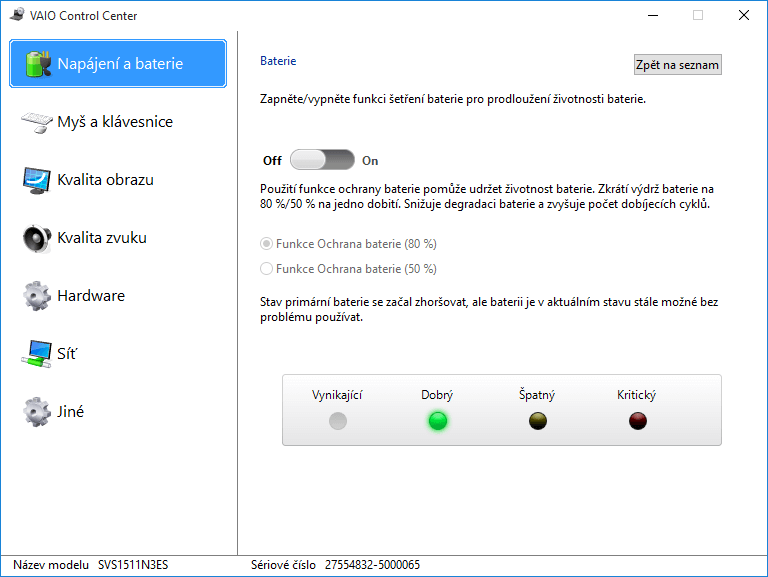
Here is a picture of the optimisation and battery saving set-up for Sony Vaio laptops.
Call us
Monday to Friday 7:00am - 3:30pm info@laptop-components.eu



© Laptop-Componets.eu 2007 - 2026 All rights reserved.